Sitoo Media Object Storage
The Media Object Storage Service provides access to media files managed by Sitoo's POS systems. It enables searching and retrieving photos associated with specific business entities such as shipment items.
Use Case: Shipment Receiving
When receiving shipments, store staff may photograph damaged or incorrect items using the POS. Each photo is linked to a specific shipment item using a composite key (shipmentId|sku|reasonCode|discrepancyId).
Downstream services can then retrieve all photos for an entire shipment, a specific SKU within a shipment, or a particular discrepancy — without needing to know individual file IDs. See Entities and Linking for details.
API Base URL
The service is available at the base URL https://media-object-storage.sitooapis.com. To access the API you combine the base URL and the endpoint URL. Example for searching files:
GET https://media-object-storage.sitooapis.com/v1/media/search?entity_type=shipment_item&entity_id=1RT823V93Authentication
Authentication is done with the HTTP basic authentication mechanism over a secure connection. The API ID and password can be found in the Backoffice under settings/Sitoo REST API (Requires administrator privileges).
Using the API ID and password, add an extra header to the request for authentication:
"Authorization: Basic " + base64_encode("{API ID}" + ":" + "{password}");Example header (API ID "10020-140" and password "buNxoOx2o5kM2JMc3VhBX20k4Gik4qKXyKfg332A"):
Authorization: Basic MTAwMjAtMTQwOmJ1TnhvT3gybzVrTTJKTWMzVmhCWDIwazRHaWs0cUtYeUtmZzMzMkE=)Errors
When a request is not successful, an error object is returned. It consists of an error_code, an error_data object
containing a message, and a request_id.
The error_code will be one of the following values:
INVALID_REQUEST— The request body or parameters are invalidACCESS_DENIED— Authentication failed or insufficient permissionsFILE_NOT_FOUND— The requested file does not existINTERNAL_ERROR— An unexpected server error occurred
Example error response:
{ "error_code": "INVALID_REQUEST", "error_data": { "message": "Invalid request parameters" }, "request_id": "f47ac10b-58cc-4372-a567-0e02b2c3d479"}Data Flow
The media search and retrieval process is straightforward — search or look up file metadata, then follow the provided download URLs.
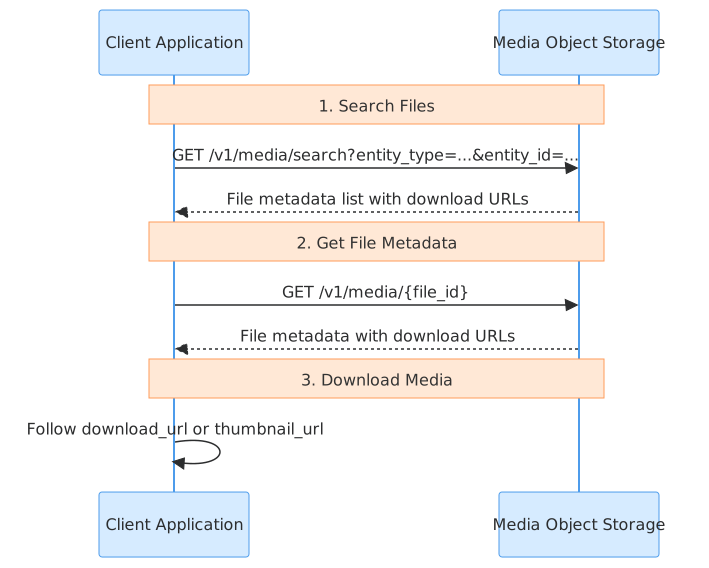
Searching Files
Use GET /v1/media/search with entity_type and entity_id query parameters to find files associated with a specific entity. The response includes file metadata and download URLs for each matching file.
Retrieving File Metadata
Use GET /v1/media/{file_id} to get metadata for a specific file. The response includes the file's download_url and thumbnail_url.
Downloading Media
The download_url and thumbnail_url fields in the file metadata are time-limited signed URLs. Simply follow these URLs to download the processed full-size image or its thumbnail.
File Processing States
Files move through the following processing states:
uploading: File upload is in progress.uploaded: File received, queued for processing.processing: Image conversion and thumbnail generation in progress.ready: Processing complete. Thedownload_urlandthumbnail_urlfields are available.failed: Processing encountered an error. The file is not available for download.
download_url and thumbnail_url fields are only present in API responses when the file status is ready. Clients should check the status field before attempting to download.
Entities and Linking
Files in the Media Object Storage service are linked to specific domain entities through an entity_type and an entity_id.
For example, photos of damaged items in a shipment use:
entity_type:shipment_itementity_id: A composite key such asshipmentId|sku|reasonCode|discrepancyId(e.g.,1RT823V93|SKU-001|DAMAGED|51076f94)
This pattern enables powerful bulk retrieval capabilities, such as querying all photos related to a specific shipment by searching for entity_type=shipment_item and an entity_id starting with the shipment ID.
Limitations
The following limitations exist for the service:
- Only
shipment_itemis currently supported as anentity_type. - All images are served as processed JPEG files regardless of the original upload format.
- Download and thumbnail URLs expire after 1 hour.
content_type and file_size) reflects the processed, downloadable JPEG file.